
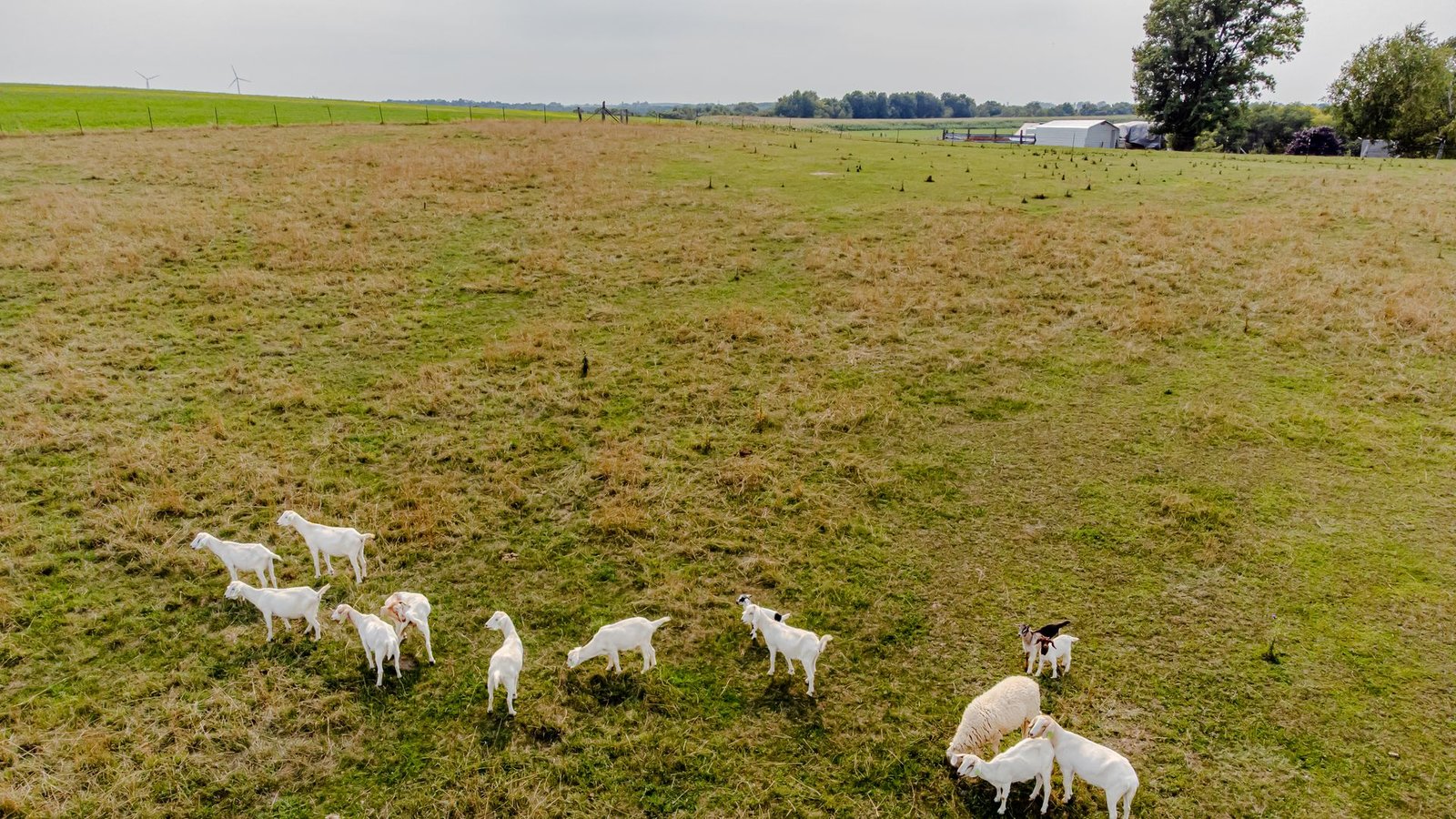
A goat farming app that keeps the herd book in your pocket.
A full walk-through of Invoiceror's goat farming app — the AgriBiz module that handles tag IDs, QR pen tags, breeding, kidding, pen transfers, sales and daily chores from your phone. Screen by screen, using the live app.
Where this lives: Goat Farming is a module inside AgriBiz, part of Invoiceror's set of industry add-ons, reached from More → Industry Solutions → AgriBiz. It sits right next to Rabbit Farming and works the same way, with goat-specific wording — pens instead of cages, kidding instead of births.
Most goat farm records still live in a notebook in the barn, a whiteboard by the pens, and a separate invoicing app for when a goat is sold. This goat farming app folds all three into the Invoiceror Android app you may already run your business through, so a doe's QR tag, her breeding log and the invoice for the buck you sold sit in the same place. The thirteen steps below cover every screen in the module, following the workflow a working herd keeper would use: tag the goat, keep its profile honest, log breeding and kidding, move it between pens, and invoice the sale.
Why use a goat farming app for record keeping?
Good goat records are what separate a herd that grows from one that just gets bigger. Knowing which doe was bred to which buck, when she is due to kid, what each goat weighs and which pen it is in is the difference between planned kidding seasons and surprises — and it is the history a buyer asks about before paying a fair price.
Paper records go missing and spreadsheets stay on one computer. A goat farm management app on your phone keeps every goat's tag, status, parentage and timeline with you in the pasture, and because it lives inside Invoiceror, the money side is right there too: log feed and vet expenses, scan the receipts with AI, and invoice every goat you sell.
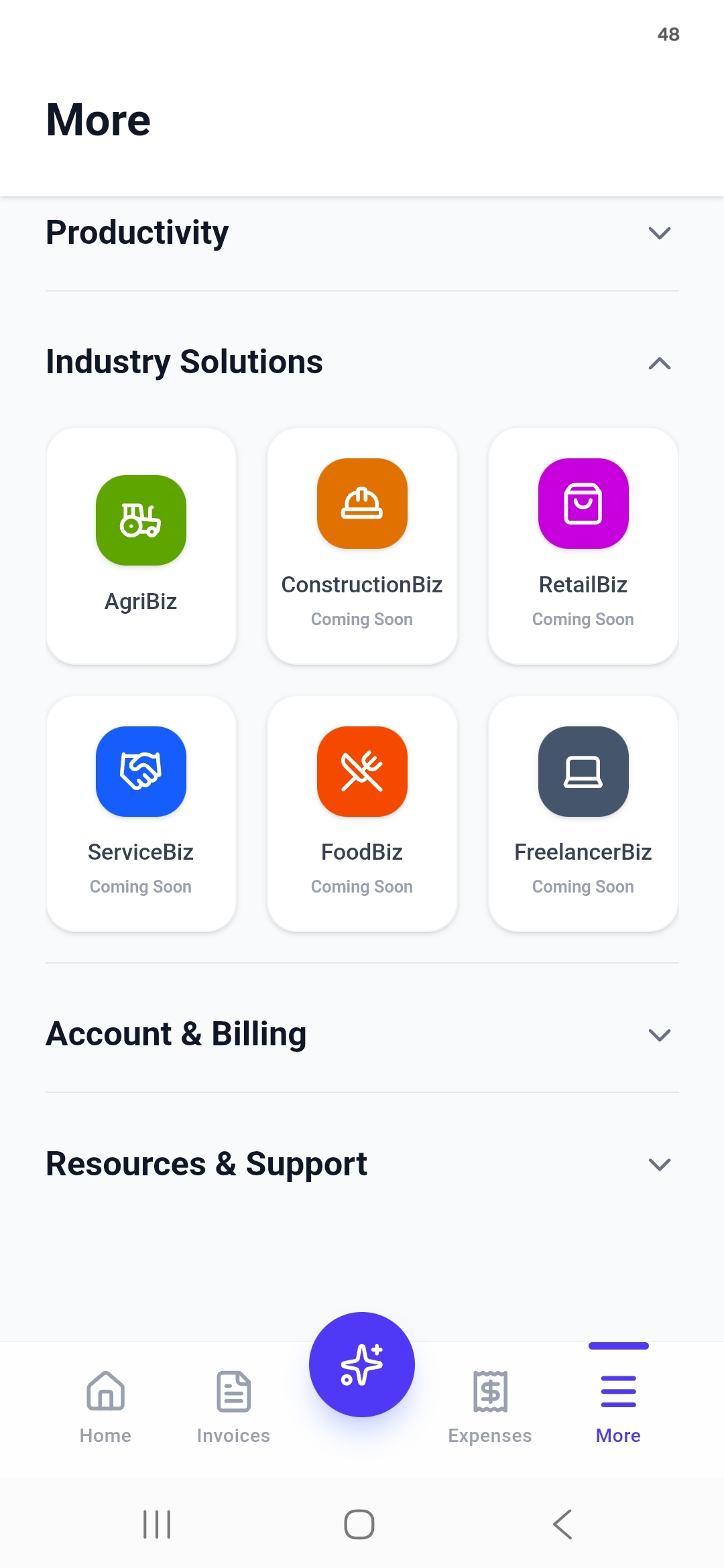
More → Industry Solutions → AgriBiz
Goat Farming doesn't sit on the main tab bar. From any screen, tap More, open the Industry Solutions group, and tap the green AgriBiz tile.
Inside AgriBiz, tap the orange Goat Farming tile. The first time you open it, give your farm a name — the examples in this guide use Godi Goat Farm — and you can rename it later with the pencil icon on the dashboard.
Your whole herd, in one count
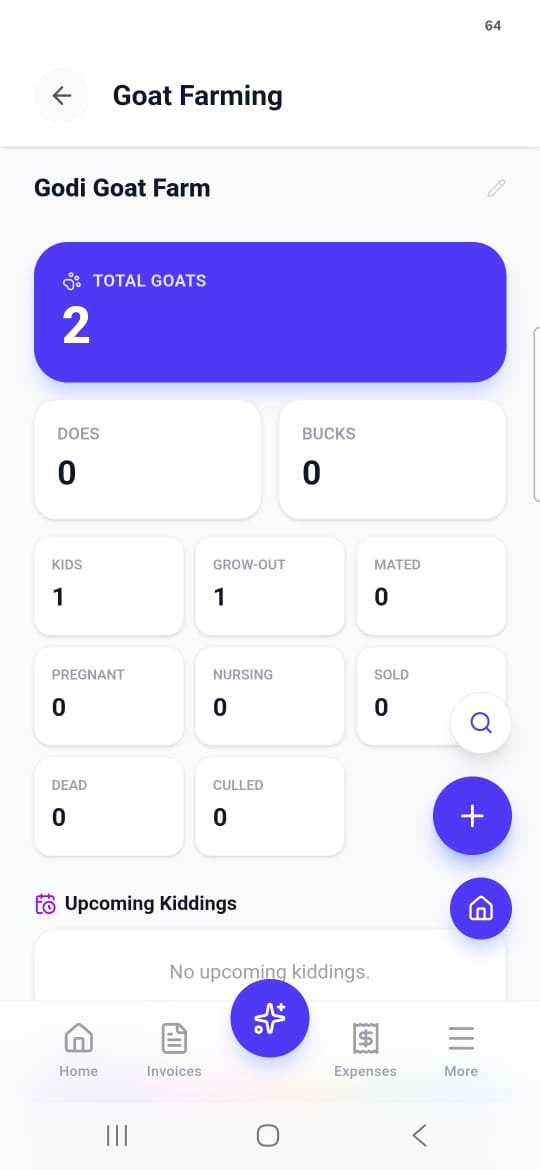
The dashboard opens on a Total Goats count, split into Does and Bucks, then a status grid — Kids, Grow-Out, Mated, Pregnant, Nursing, Sold, Dead and Culled — so you can read the state of the herd at a glance — the farm equivalent of the main Invoiceror dashboard.
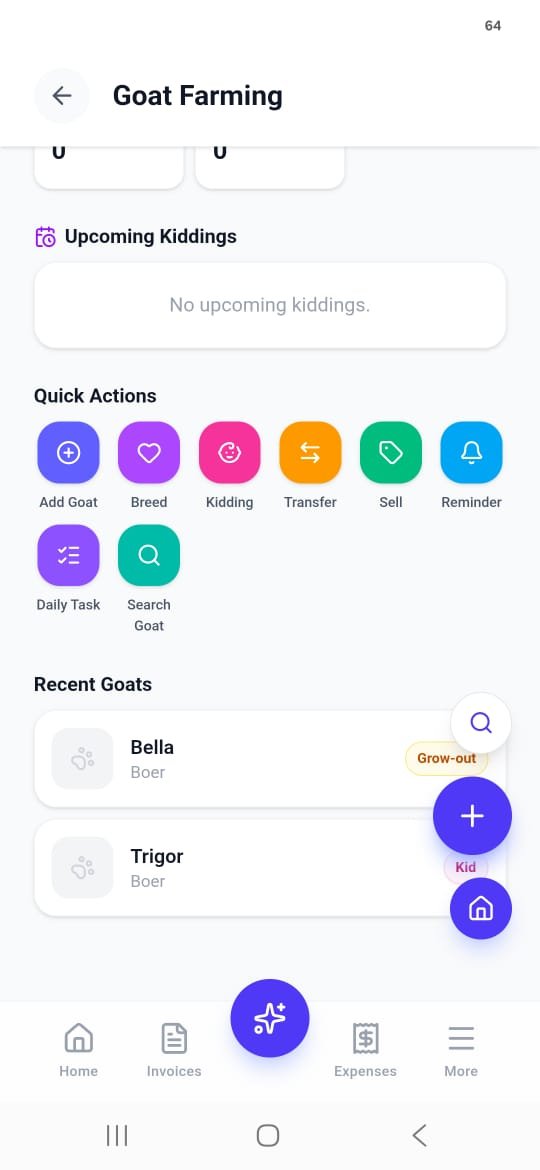
Below it, Upcoming Kiddings lists which doe is due and when, worked out from the breeding records you save later in this guide. Until a doe is bred it simply reads "No upcoming kiddings."
Eight actions cover a whole day's work
Scroll down and the dashboard turns into a toolbar. Every job you'd do walking the pens has its own one-tap action, with your Recent Goats listed underneath:
Filter the herd, or scan straight to one goat
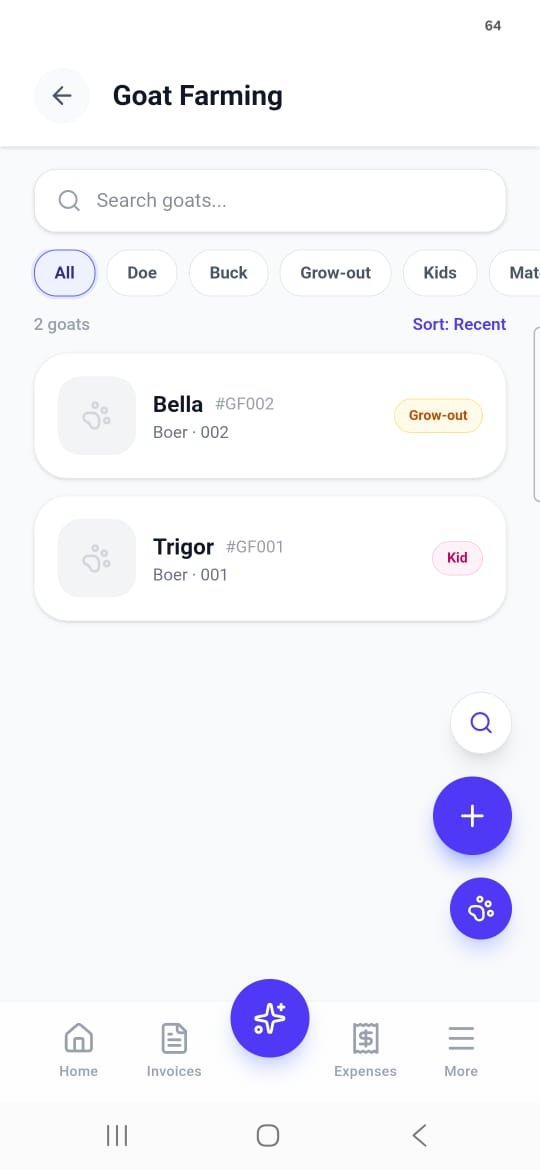
The goat list shows every animal with its name, Tag ID (e.g. #GF002), breed, pen and a colored status pill. Filter chips across the top — All, Doe, Buck, Grow-out, Kids, Mated and more — narrow it down, and Sort: Recent keeps the newest additions on top.
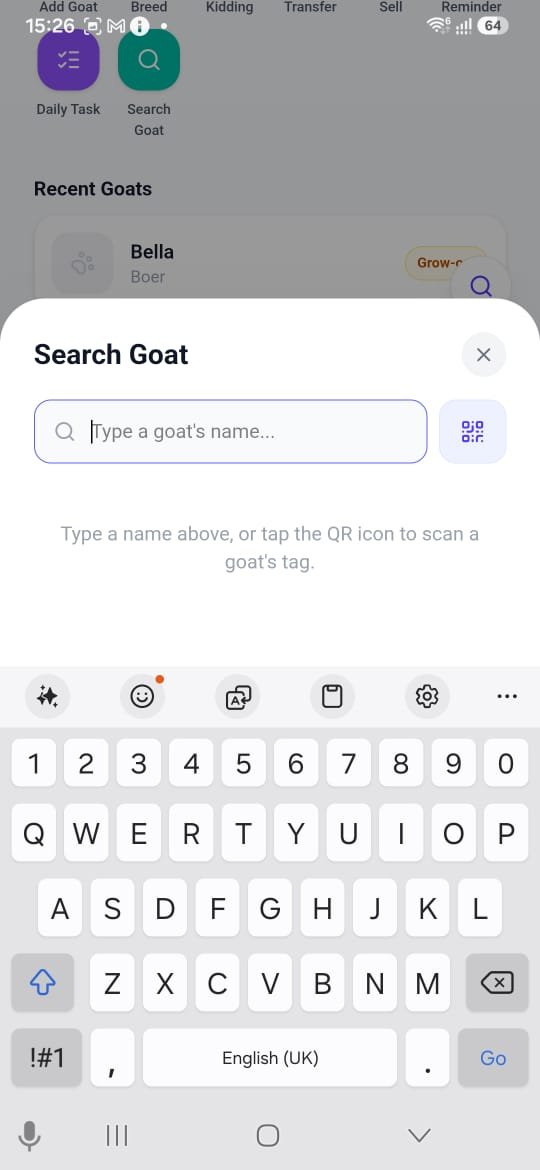
In a hurry? Search Goat opens a search sheet: type a goat's name, or tap the QR icon and scan the tag on its pen to jump right to its profile.
Every goat starts with a Tag ID
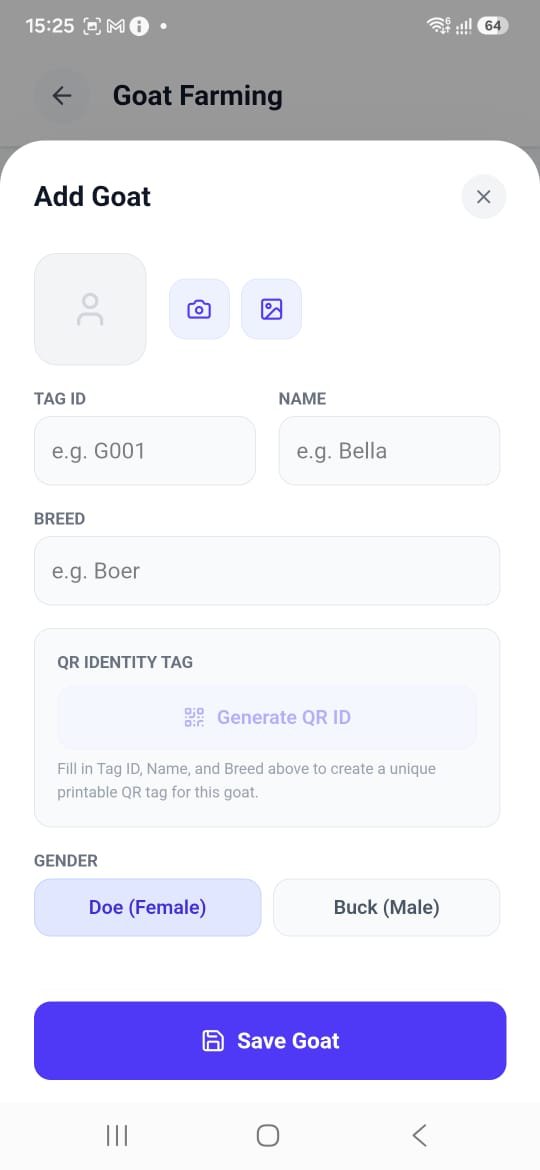
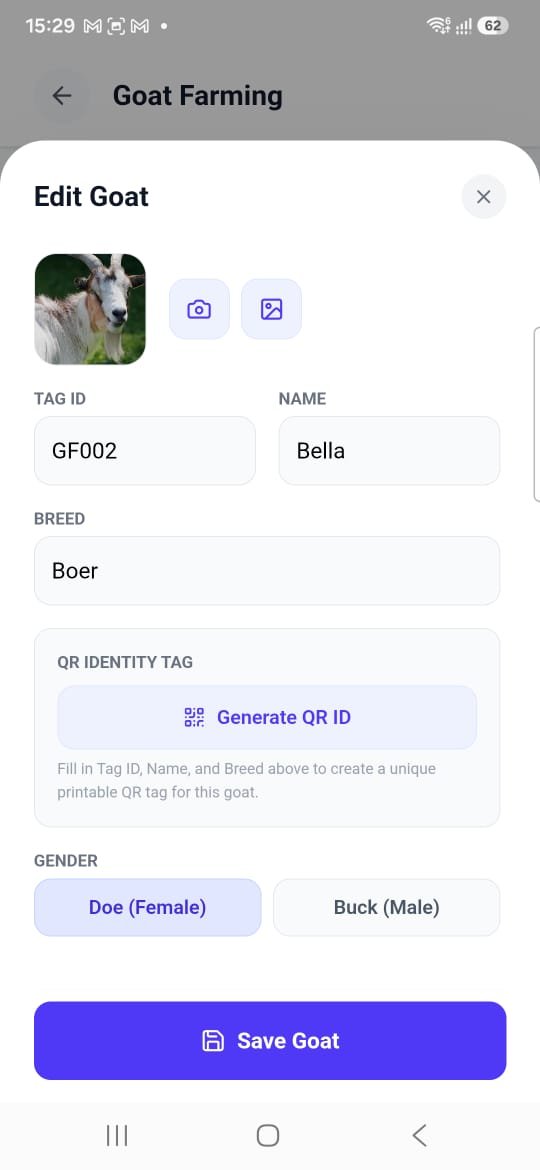
Add a photo with the camera or gallery button, then fill in Tag ID (e.g. G001), Name and Breed — Boer (the American Boer Goat Association keeps the herd book), Kiko, or dairy breeds like Nubian and Saanen registered with ADGA — whatever runs on your farm. As soon as those three are filled, Generate QR ID lights up and builds a unique, printable QR tag for that goat.
Scroll down for the rest: Gender (Doe or Buck), a starting Status, date of birth, weight in kg, color, current pen, and the mother and father — picked from your herd, or typed in by name or farm if they came from somewhere else.
- Tag ID
- Name
- Breed
- Generate QR ID
- Doe / Buck
- Status
- Date of Birth
- Weight (kg)
- Color
- Current Pen
- Mother / Father
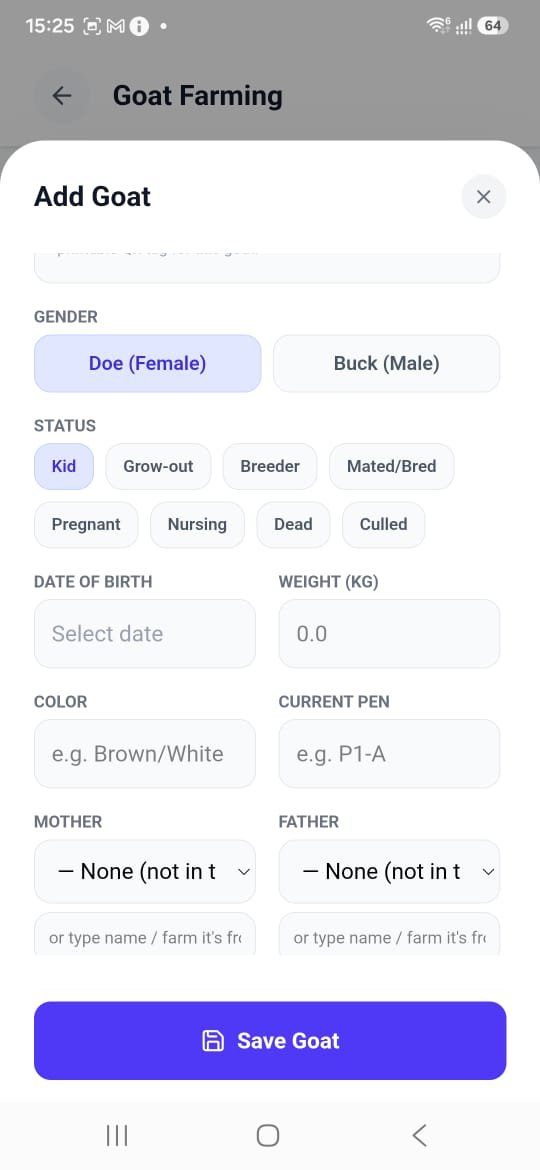
One card holds the whole animal
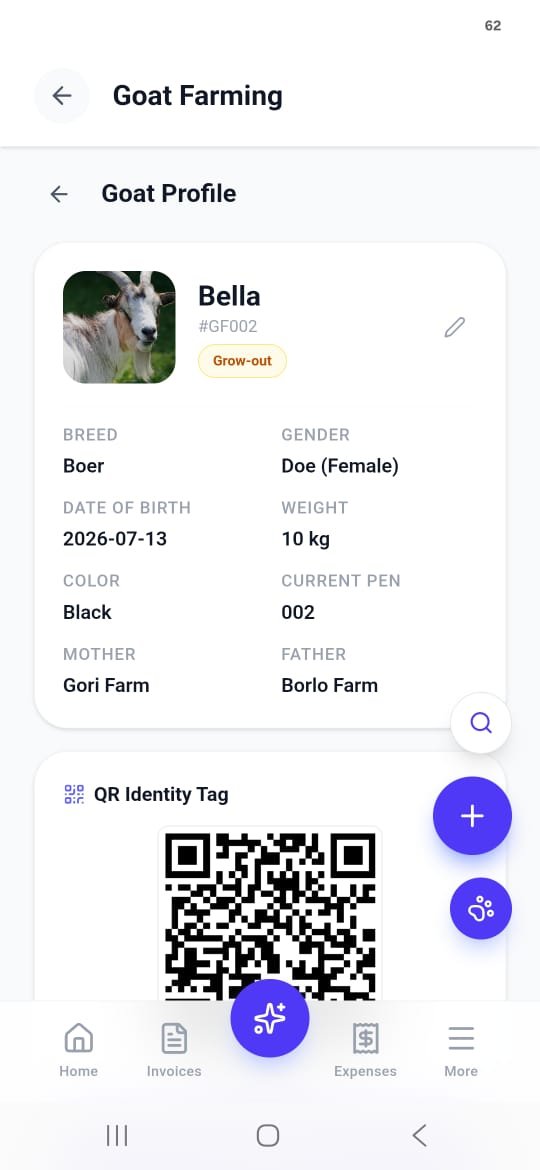
Tap any goat and its profile lays out what you'd otherwise keep on a pen card: photo, Tag ID, status pill (Grow-out), Breed, Gender, Date of Birth, Weight, Color, Current Pen, Mother and Father.
Tap the pencil icon to edit. The Edit Goat sheet is the same form you added it with, pre-filled — swap the photo, fix a typo in the tag, or update the status as the goat grows.
A tag you can hang on the pen
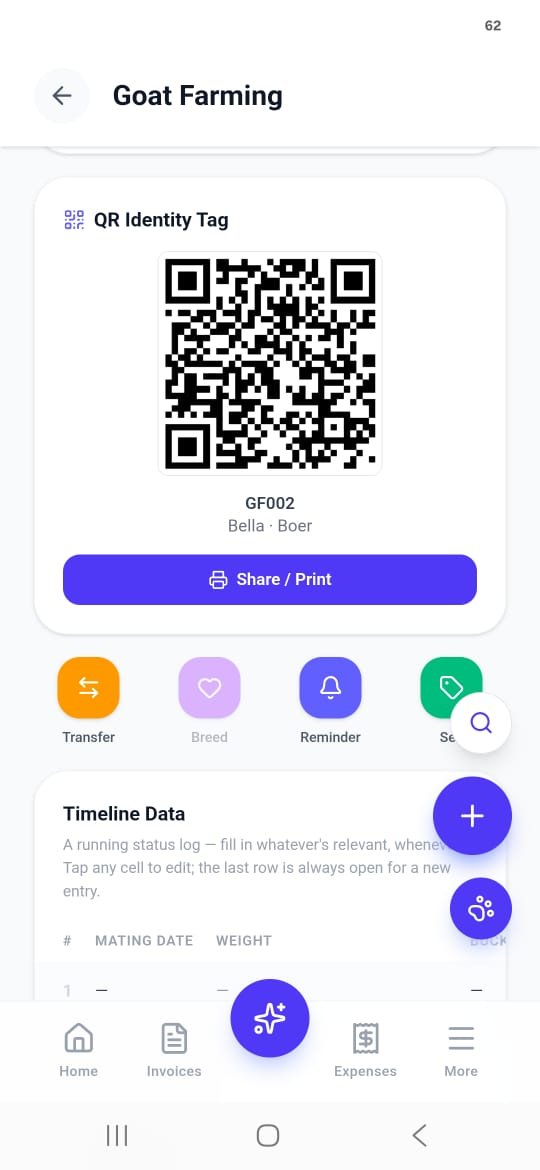
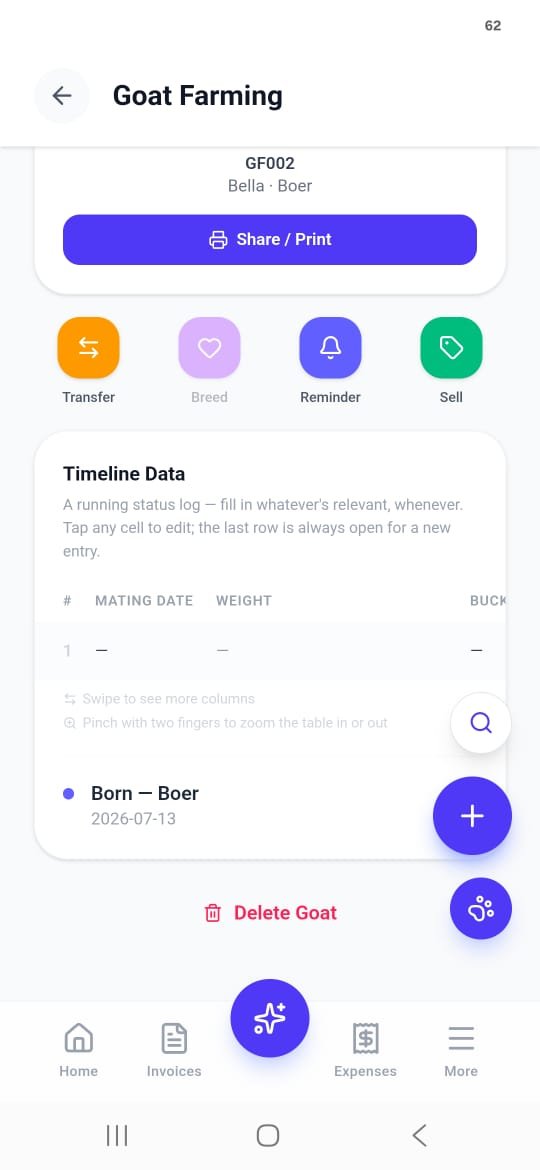
Every goat's QR Identity Tag sits on its profile under the details, labelled with its Tag ID, name and breed (GF002 · Bella · Boer), with a Share / Print button. Print it for the pen gate or a collar tag, and scanning it from Search Goat opens that goat's profile — no scrolling through a list, no guessing at faded marker.
Right under the tag are shortcut buttons for that goat: Transfer, Breed, Reminder and Sell.
A running log for every goat
Underneath each profile sits a spreadsheet-style Timeline Data table — Mating Date, Weight, Buck and more columns off to the side. Swipe to reach them, pinch with two fingers to zoom, and tap any cell to edit. The last row is always left open for the next entry.
Below the table, life events are stamped automatically — for example Born — Boer · 2026-07-13. And if a goat leaves the herd for good, Delete Goat is at the very bottom.
Breeding needs two Breeders
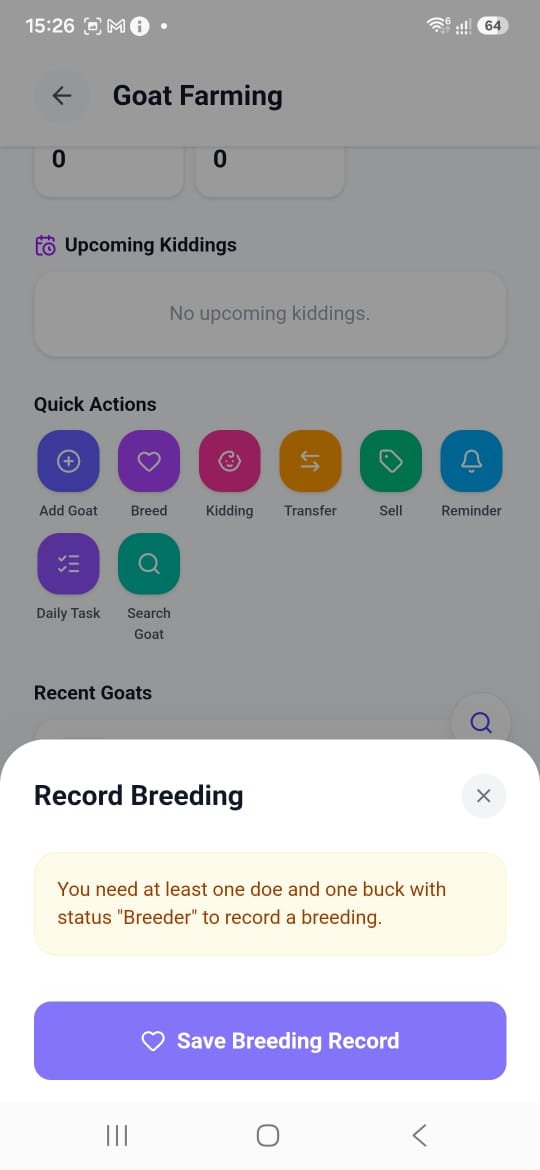
Record Breeding pairs a doe with a buck and saves the date. There's one rule: both animals must have the status Breeder. If you don't have at least one of each yet, the sheet tells you so — set the status in Edit Goat first.
Once a breeding is saved, the doe's expected due date shows up under Upcoming Kiddings on the dashboard. A doe's gestation runs 148 to 152 days, about five months, so that countdown is worth having. When the kids arrive, use the Kidding quick action to record them against the doe.
Pen moves stay on the record
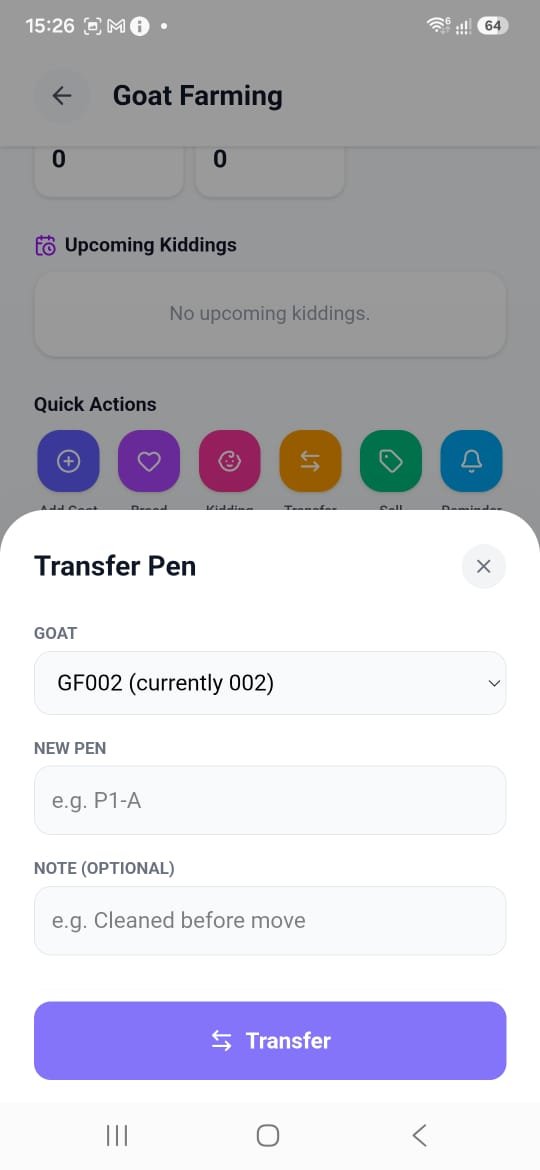
Choose the goat — its current pen shows right in the picker, e.g. GF002 (currently 002) — enter the New Pen code (e.g. P1-A), and add an optional note like "Cleaned before move." The move is saved to that goat's record, not to a whiteboard that gets wiped.
Sell a goat, and the invoice is already started
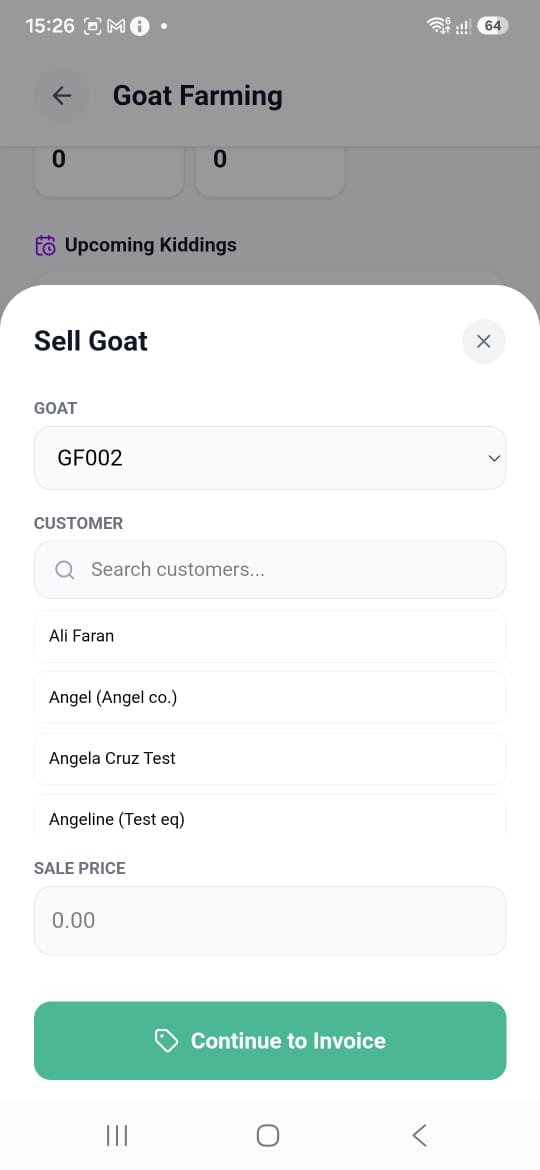
This is where a farm module inside an invoicing app pays off. Pick the Goat, choose the Customer from your existing Invoiceror customer list, enter the Sale Price, and tap Continue to Invoice.
You land in a normal Invoiceror invoice for that buyer, ready to send on WhatsApp with a payment link, by email or as a PDF — and the goat moves into the Sold counter on the dashboard.
One-off alerts, same bell as invoices
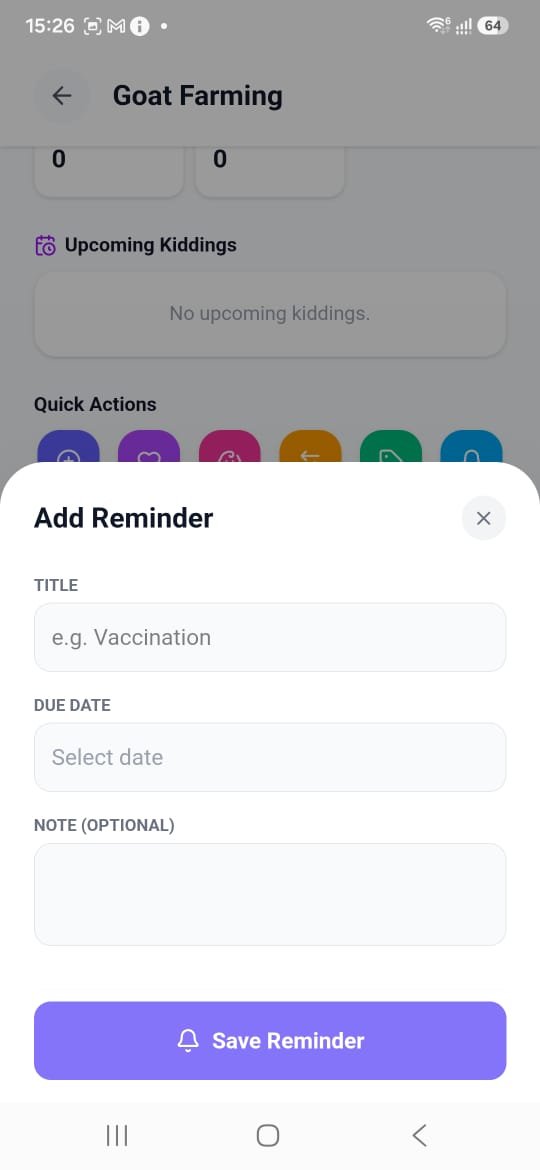
A Reminder needs just a Title (e.g. "Vaccination" or "Deworming") and a Due Date, with an optional note. It lands in Invoiceror's existing reminder bell — the same one tracking your invoice payment reminders — so farm jobs and business admin show up in one place.
Chores that repeat, and prove they happened
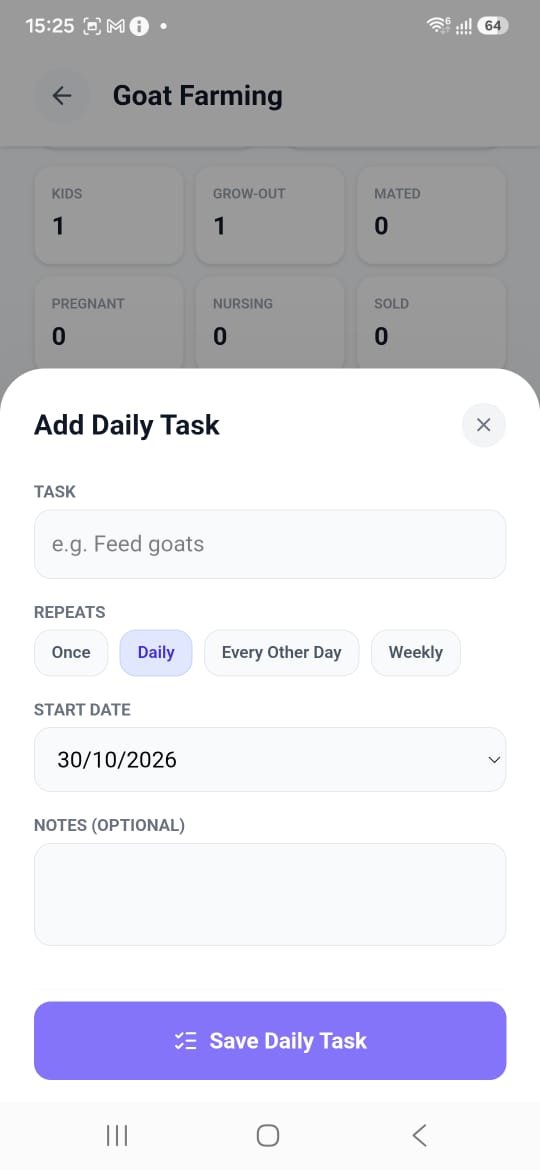
Daily Task is different from a Reminder — it's a recurring checklist item. Name the task ("Feed goats"), pick how often it repeats — Once, Daily, Every Other Day or Weekly — set a start date, and add notes if you like.
Each due day gets its own tickable entry, so if hired help does the feeding or mucking out, a missed day shows up as missed instead of quietly disappearing. It works like Invoiceror's task tracker and daily activity tracker, tuned for farm chores.
Goat farming app FAQ
Is there an app for goat farm record keeping?
Yes. Invoiceror's Goat Farming module, inside AgriBiz, keeps a record for every goat — Tag ID, name, breed, gender, status, date of birth, weight, color, pen, mother and father — plus a Timeline Data log, breeding and kidding records, pen transfers and sales. It runs on Android and is free to download from Google Play.
Can I print QR ear tags or pen tags for my goats?
Yes. Once a goat has a Tag ID, name and breed, tap Generate QR ID. The QR Identity Tag on its profile has a Share / Print button, and scanning the printed tag from Search Goat opens that goat's profile.
How does the app track kidding dates?
Record a breeding between a doe and a buck that both have Breeder status. The doe's expected due date then appears under Upcoming Kiddings on the dashboard, and you log the kids with the Kidding action when they arrive.
Can I invoice a goat sale from the app?
Yes. Sell Goat lets you pick the goat, choose a customer and enter the sale price, then Continue to Invoice opens a regular Invoiceror invoice you can send by WhatsApp, email or PDF.
Does Invoiceror support other livestock?
Goat Farming, Rabbit Farming and Cattle Farming are live in AgriBiz today. Chicken, Fish, Pig and Vegetable Farming are listed as coming soon.
Tag it, breed it, track it, sell it.
Goat Farming is live inside Invoiceror today, built on the same invoicing and expense tracking you already run your business on. Cattle Farming is live as well, and Chicken, Fish, Pig and Vegetable Farming are next up in AgriBiz.
Photos: herd on open farmland by Wikideas1 (CC0); goats grazing pasture by the U.S. Fish and Wildlife Service (public domain), via Wikimedia Commons. App screenshots: Invoiceror.
